How can I add a TikTok account?
Adding a TikTok account works in the same way as adding any other Social Media account. Simply follow these steps or have a look at the video below.
- Go to the influencer group tool and click on the group you want to add the influencer to.
- Click on Add Influencer in the bottom right corner.
- Enter the username* of the TikTok account into the field next to the + icon.
- Make sure that the account is not already in the system. If that is the case, you will only see the message "Influencer doesn't exist in our system, click here to add manually".
- Click on Add now.
- As a default, our system has Instagram as a platform. You can delete that by clicking on the trash can icon.
- Now you click on Add profile and select TikTok.
- Enter the username*.
- As the last step, click on Add in the top right corner of the screen. Now you only need to click on Add to group and you are done.
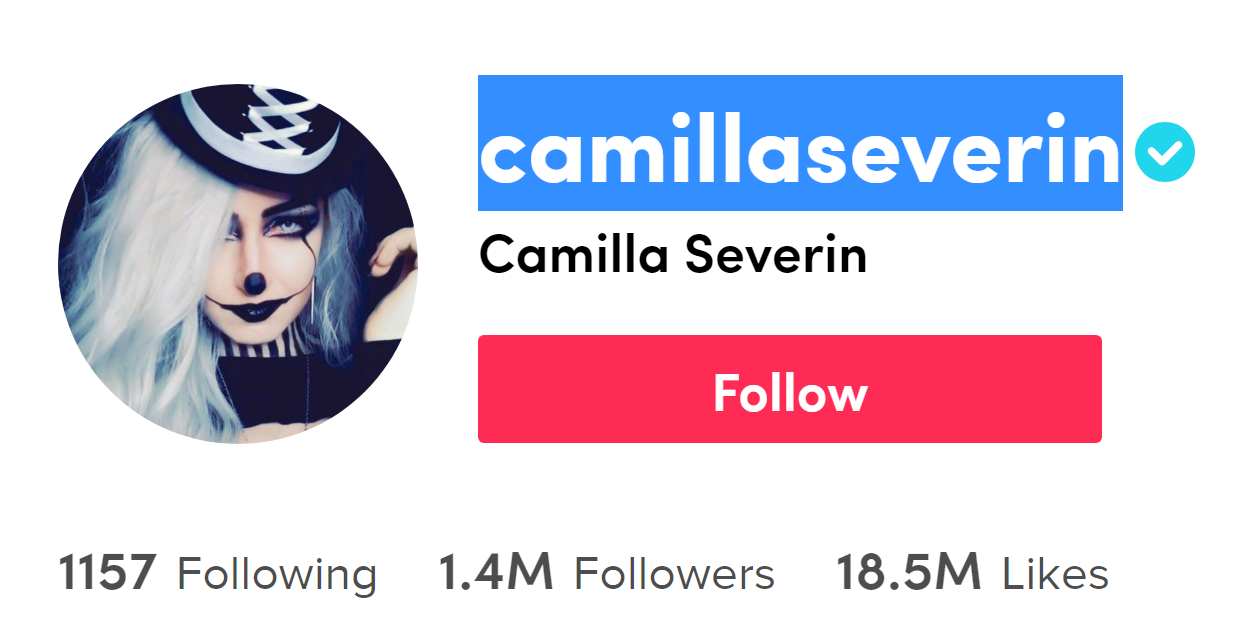
* The username is the name that is marked blue in the image below.
Video explanation: